Image 1 of 3
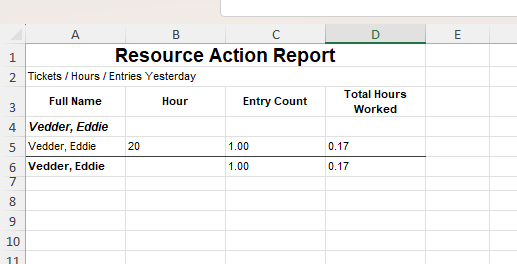 Image 2 of 3
 Image 3 of 3
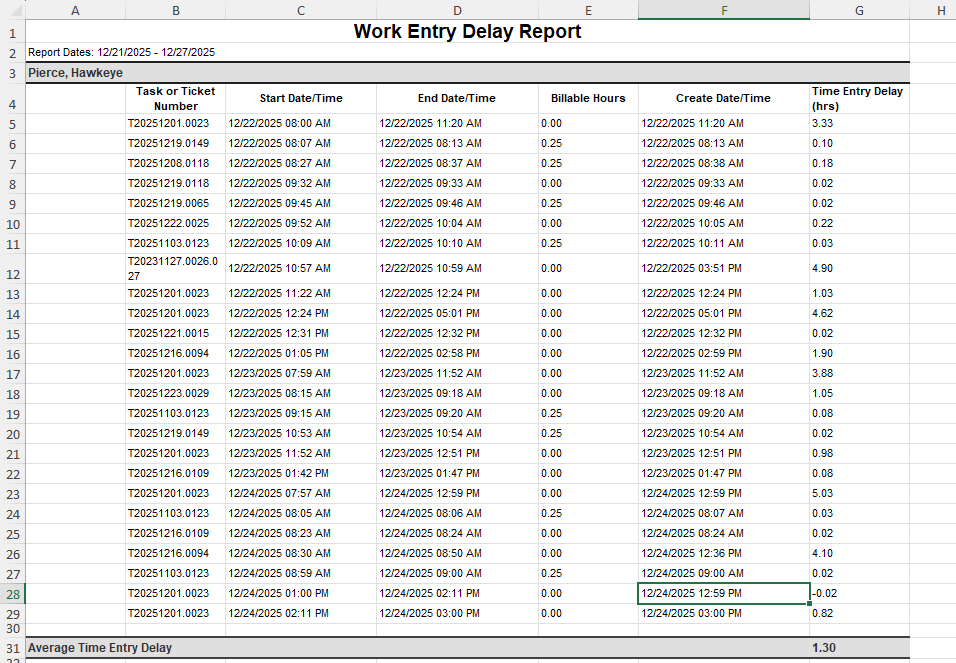
This report shows how many time entries each technician logs per hour, broken down across the workday. If a tech records entries between 2–3 PM, you’ll see exactly how many — and if they don’t, that gap becomes visible.
This exposes workload patterns, time-tracking habits, and potential data gaps before they turn into billing issues or performance problems. When a technician goes several hours without an entry, this report highlights it — which often means they’re either working without logging or tracking time somewhere else (or not at all).
If you’ve ever wondered:
“Why does this person have so few hours in the system?”
“Where is all their time going?”
“Why does invoicing feel like detective work?”
…this is the report that answers those questions.
✔️ Service desk leads who want visibility without micromanaging
✔️ MSP owners trying to understand low billable hours
✔️ Coaches/mentors training new technicians on PSA habits
✔️ Identifying time-entry drop-offs and delayed logs
✔️ Billing audits and time-tracking compliance
Hour-by-hour time entry volume by technician
Who is actively logging in real-time vs retroactively
Workload spikes, bottlenecks, and idle periods
Early warnings on burnout, overwhelm, or underutilization
Documentation discipline and PSA hygiene
📄 PDF Build Guide
Step-by-step walkthrough of the entire build
Every formula included + appendix for copy/paste
Field-by-field explanations so you actually learn LiveReports
🔧 Format & Structure Training
Why each step exists (not just “click here”)
Understand how LiveReports think so you can modify confidently
🎥 Support & Fine Tuning
Email support included
Short video explainers to help with tuning your layout
🚀 Optional Install Help (Add-On)
If you prefer, I’ll install and tune it with you in your tenant
(available as a bundle when you buy multiple reports)
🔌 Plug-and-Play Ready
Built for most Autotask tenants
Use as-is or as a foundation for more advanced reporting
✨ Bonus
Learn a formatting approach you can reuse everywhere
Build reporting confidence and reduce Autotask guesswork
Autotask LiveReports access
Time Entry / Resource tracking in use
This report shows how many time entries each technician logs per hour, broken down across the workday. If a tech records entries between 2–3 PM, you’ll see exactly how many — and if they don’t, that gap becomes visible.
This exposes workload patterns, time-tracking habits, and potential data gaps before they turn into billing issues or performance problems. When a technician goes several hours without an entry, this report highlights it — which often means they’re either working without logging or tracking time somewhere else (or not at all).
If you’ve ever wondered:
“Why does this person have so few hours in the system?”
“Where is all their time going?”
“Why does invoicing feel like detective work?”
…this is the report that answers those questions.
✔️ Service desk leads who want visibility without micromanaging
✔️ MSP owners trying to understand low billable hours
✔️ Coaches/mentors training new technicians on PSA habits
✔️ Identifying time-entry drop-offs and delayed logs
✔️ Billing audits and time-tracking compliance
Hour-by-hour time entry volume by technician
Who is actively logging in real-time vs retroactively
Workload spikes, bottlenecks, and idle periods
Early warnings on burnout, overwhelm, or underutilization
Documentation discipline and PSA hygiene
📄 PDF Build Guide
Step-by-step walkthrough of the entire build
Every formula included + appendix for copy/paste
Field-by-field explanations so you actually learn LiveReports
🔧 Format & Structure Training
Why each step exists (not just “click here”)
Understand how LiveReports think so you can modify confidently
🎥 Support & Fine Tuning
Email support included
Short video explainers to help with tuning your layout
🚀 Optional Install Help (Add-On)
If you prefer, I’ll install and tune it with you in your tenant
(available as a bundle when you buy multiple reports)
🔌 Plug-and-Play Ready
Built for most Autotask tenants
Use as-is or as a foundation for more advanced reporting
✨ Bonus
Learn a formatting approach you can reuse everywhere
Build reporting confidence and reduce Autotask guesswork
Autotask LiveReports access
Time Entry / Resource tracking in use