 Image 1 of 2
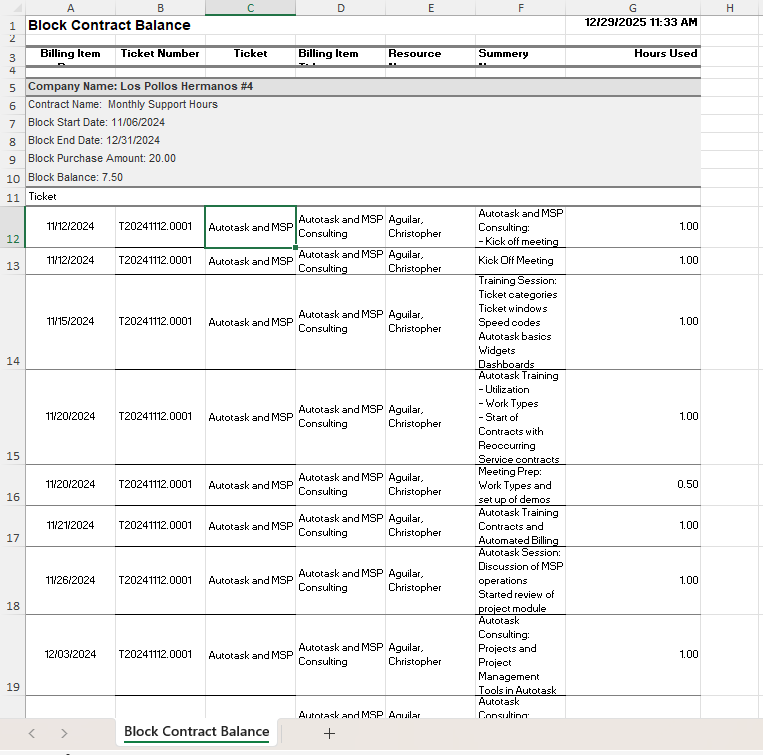 Image 2 of 2
Block Hour Contract Report + Dax Analyzer
$59.00
This report gives you a clear view of all block-hour contracts in your Autotask environment — including remaining balances, expiration dates, and usage trends — so you can see which agreements are healthy and which ones are quietly drifting into risk.
When paired with Dax Analyzer, the report stops being a static snapshot and becomes an early-warning system.
All active and expired block-hour contracts
Remaining hour balances
Contract start and end dates
Usage patterns that indicate burn rate trends
On its own, this helps you understand where block time stands.
With Dax, it tells you what to do about it.
Dax reviews the report and surfaces clients who:
Are projected to run out of hours based on current burn rate
Will likely need a renewal or hour top-up in the next 30 days
Are actively over-consuming block hours
Have expired contracts with:
zero remaining hours
unused balances
Show unusual variances that often signal:
missed renewals
misaligned contract terms
unmanaged overages
Dax doesn’t just flag problems — he explains why they matter and which ones actually need attention.
Block contracts rarely fail loudly.
They fail quietly — until a client is out of hours, unhappy, or already upside down.
This report helps you:
Get ahead of renewal conversations
Prevent surprise overages
Identify upsell and realignment opportunities
Protect margins without guesswork
Run the report on a schedule
Review Dax’s analysis alongside the data
Know exactly which clients are in jeopardy — and which are fine
No spreadsheets.
No manual forecasting.
No “we’ll keep an eye on it.”
MSP owners
Service delivery managers
Account managers responsible for contract health
If block hours are part of your business, this report belongs in your regular review cycle
This report gives you a clear view of all block-hour contracts in your Autotask environment — including remaining balances, expiration dates, and usage trends — so you can see which agreements are healthy and which ones are quietly drifting into risk.
When paired with Dax Analyzer, the report stops being a static snapshot and becomes an early-warning system.
All active and expired block-hour contracts
Remaining hour balances
Contract start and end dates
Usage patterns that indicate burn rate trends
On its own, this helps you understand where block time stands.
With Dax, it tells you what to do about it.
Dax reviews the report and surfaces clients who:
Are projected to run out of hours based on current burn rate
Will likely need a renewal or hour top-up in the next 30 days
Are actively over-consuming block hours
Have expired contracts with:
zero remaining hours
unused balances
Show unusual variances that often signal:
missed renewals
misaligned contract terms
unmanaged overages
Dax doesn’t just flag problems — he explains why they matter and which ones actually need attention.
Block contracts rarely fail loudly.
They fail quietly — until a client is out of hours, unhappy, or already upside down.
This report helps you:
Get ahead of renewal conversations
Prevent surprise overages
Identify upsell and realignment opportunities
Protect margins without guesswork
Run the report on a schedule
Review Dax’s analysis alongside the data
Know exactly which clients are in jeopardy — and which are fine
No spreadsheets.
No manual forecasting.
No “we’ll keep an eye on it.”
MSP owners
Service delivery managers
Account managers responsible for contract health
If block hours are part of your business, this report belongs in your regular review cycle